
November 12, 2026·4 min read

A system design interview usually ends with a photo of a whiteboard. Boxes, arrows, a cylinder labelled "DB", and a lot of what the candidate said that nobody wrote down. The next morning the panel argues about what they remember.
EasyEnv now has a system design question type and a System Design Lab. The candidate builds the architecture on a canvas that knows what a load balancer, a Postgres replica or a Kinesis stream is. Your reviewer gets a design they can read, the reasoning written next to it, and a replay of how it was built. This post is for the people who run and review those interviews: what changes, what it looks like, and where it is not the right tool.
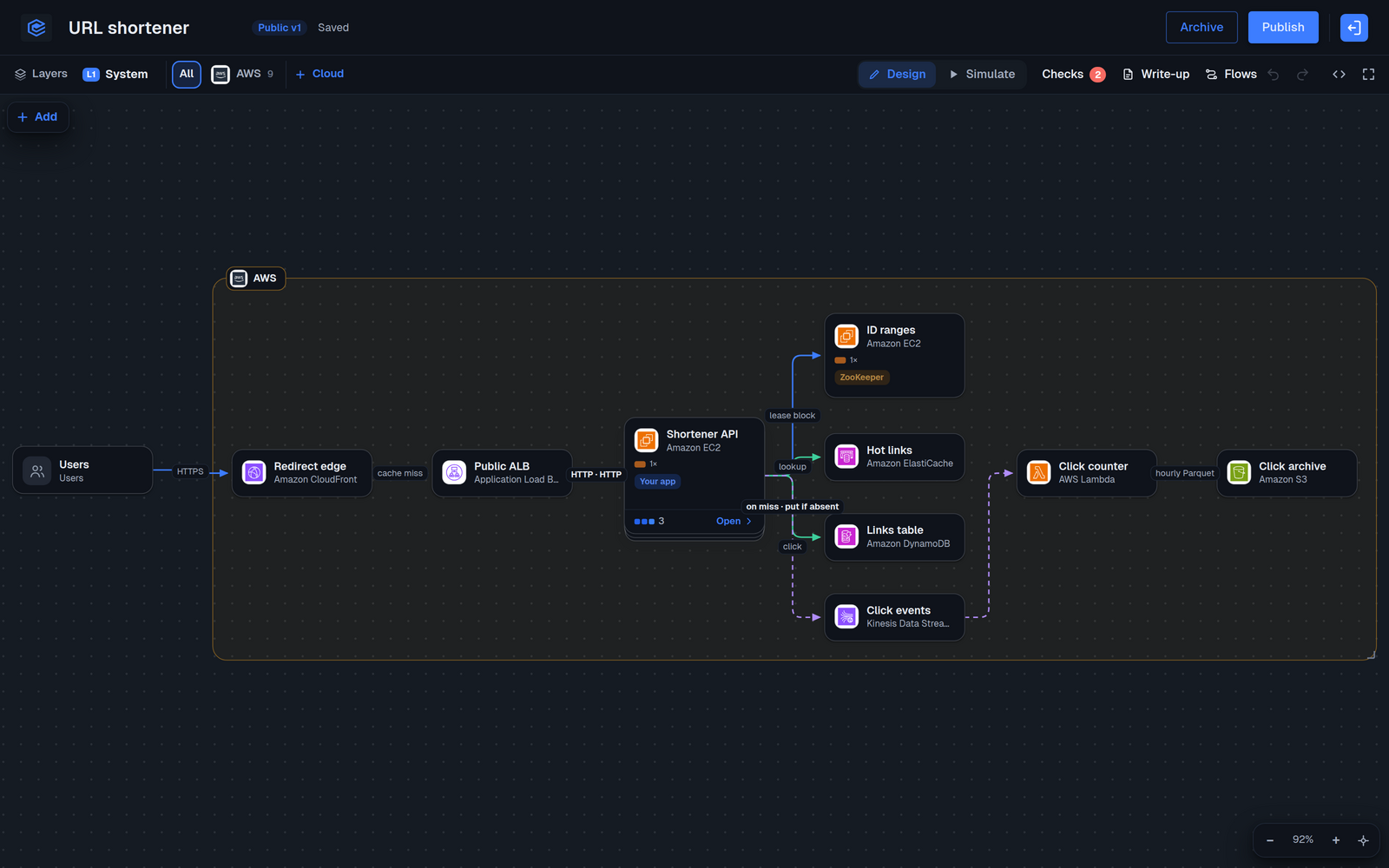
Every card on the canvas is a real thing: a cloud, a product inside that cloud (aws.alb, aws.rds, a GKE cluster), or a service you name yourself. Cards nest. Open the API card and you see what runs inside it. Lines carry a label, such as HTTPS, a cache lookup or an async publish.
Because the answer is a structure and not a picture, three things become possible that a whiteboard photo cannot give you:
AWS / Shortener API, and every line between them.The scoring stays human. The review page says it plainly: the reviewer decides, and neither the checks nor the simulator produce a score. If you want a structure for that decision, our system design interview rubric still applies, now with evidence you can point at.
A blank canvas tests whether someone has memorised the "design Twitter" answer. A running system that is about to fall over tests judgment.
A question can open with a starting design. One we use internally reads: "This checkout handles 300 requests a second and fell over during the last sale, at around 900. The next sale expects 3,000. The design you see is what runs today. Change it so it survives the sale, and say why on the parts you change."
To write one, you either draw the starting design in the question form, or paste a short YAML file with the code button. Leave it empty and the candidate gets a blank canvas.
version: 1
nodes:
  - {id: users, kind: client, name: Customers}
  - id: aws
    kind: aws
    children:
      - {id: lb, product: aws.alb, name: Public LB}
      - {id: api, product: aws.ec2, roles: [app]}
      - {id: db, product: aws.rds}
edges:
  - {from: users, to: lb, label: HTTPS}
  - {from: lb, to: api}
  - {from: api, to: db, kind: query}
The best part of a strong system design answer was never the diagram. It was "reads outnumber writes 100 to 1, so the edge answers most of them". That sentence used to live in the candidate's head or in a separate doc nobody opened.
Now a design carries a write-up: requirements, estimates, the API, trade-offs. Type @ and you mention a card, so the text points at the exact box it argues for. A design can also carry flows: one request walked across the lines you drew, step by step. "Browser asks for /abc123, the edge has a cached 301, on a miss the ALB sends it to a healthy API instance."
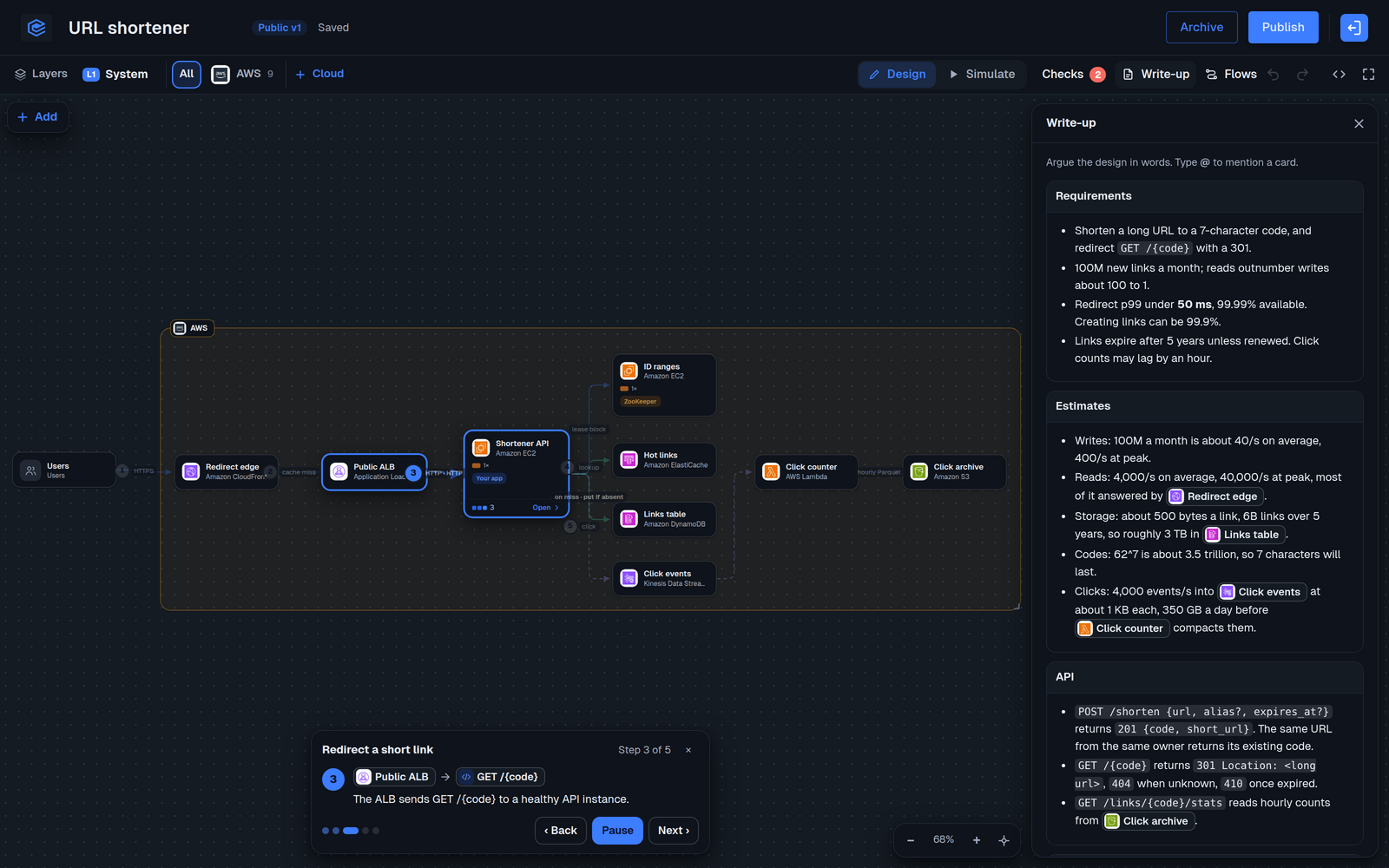
In the review, the write-up and flows come first, under "Candidate reasoning". A candidate who did not write anything is visible too. The page says so and suggests you ask about it in the next interview.
The System Design Lab is the same canvas without a candidate attached. Your team makes a design from a blank page, from one of 16 templates (AWS three tier, a GCP shared VPC, Kubernetes, a rate limiter, a payment system, RAG over an LLM and more) or from pasted YAML. Then switch to Simulate.
Drag the traffic slider up. Every card fills. Success rate, latency, the bottleneck and a rough monthly cost update as you go. In the URL shortener above, at 1,400 requests a second a single EC2 instance behind the API runs at 176% and success falls to about a third. You can also take a zone down, or click a card to kill it, and watch where the load goes.
To be clear about what this is: a rough estimate to argue with, never a score. It is there so the conversation is about numbers, not adjectives. Simulate is in the Lab today. Candidates in a question get the canvas, the write-up and flows, but not the simulator.
A finished design can be published as a frozen version under a link. Anyone with the link can open the full canvas, read the write-up and play the flows without signing in. Signed-in readers can clone it into their own account. Later edits only reach the link when you publish again, so a half-finished change never goes live. Links are unlisted and not indexed.
That makes a design useful outside interviews: an onboarding page for new engineers, the "how it works" section of an RFC, or the reference answer your interviewers calibrate on.
Pick the system your team actually runs, draw the version that is about to hurt, and make that the question. You will learn more from how a candidate changes a real design under a real constraint than from another round of "design a URL shortener".
The Lab is under Labs, System Design, and works on the free workspace plan. What is the one system in your stack you would want a senior candidate to redesign?
Run live coding sessions and take-home challenges in real production environments. Watch sessions back, score consistently, and hire with confidence.
More posts you might like
Most hiring dashboards measure activity: interviews held, candidates sourced, pipeline volume. Four other numbers actually tell you whether the process works, and three of them are uncomfortable on purpose. Here is how to measure each one without new tooling.
Entry-level software hiring has fallen across six countries while senior hiring held steady, and the data says AI is only part of the reason. Here is what that means for junior engineers trying to get in, and for the hiring managers deciding who to let in.
Read more
EasyEnv now plugs into Pinpoint. Click Send to EasyEnv on a candidate, or let a stage do it for you, and the status and your team's decision come back onto the candidate in Pinpoint.
Read more
